
95 lines
3.8 KiB
Markdown
95 lines
3.8 KiB
Markdown
# 描述
|
||
简单描述git仓库使用方式和基础命令
|
||
|
||
# 工具
|
||
* gitbash
|
||
* git仓库服务器(github/gitlab/gitea等服务器)
|
||
|
||
# 环境搭建
|
||
|
||
## windows
|
||
windows系统可以安装[git for windows](https://gitforwindows.org/),内置工具gitbash,gitgui,官网下载即可(for free)。
|
||
### gitbash
|
||
gitbash是一款命令行管理本地git仓库的工具,其终端兼容bash命令(和linux命令一样),命令使用方式[见下节](#git命令使用)。
|
||
### gitgui
|
||
gitgui可以图形化管理git仓库,没有使用过,可以百度一下或自行摸索。
|
||
|
||
# git基础知识
|
||
git是一个分布式的版本管理系统,不依赖与线上服务器就可以进行项目版本迭代。完全本地化控制项目代码的提交控制,可以自行选择提交到任何一个git仓库服务器上。SVN必须链接服务器才能进行版本的迭代和提交,git可以在本地迭代代码,需要提交到服务器时可以一并全部提交到服务器上。详见[官网基础指南](https://git-scm.com/book/zh/v2/%E8%B5%B7%E6%AD%A5-Git-%E5%9F%BA%E7%A1%80)
|
||
|
||
# git命令使用
|
||
|
||
## 初始化项目
|
||
进入项目目录,执行以下命令可以在本地初始化一个git项目
|
||
`git init`
|
||
|
||
## git仓库管理
|
||
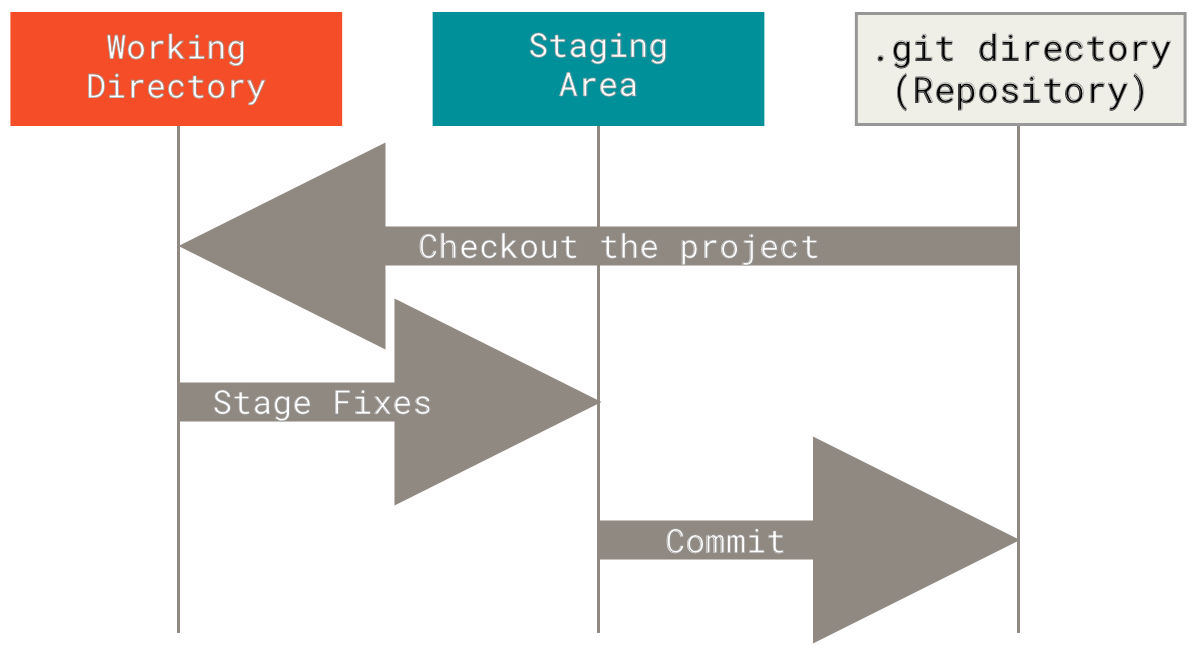
Git 项目的三个工作区域的概念:Git 仓库、工作目录以及暂存区域。
|
||
|
||
* 工作目录
|
||
工作目录是对项目的某个版本独立提取出来的内容。 这些从 Git 仓库的压缩数据库中提取出来的文件,放在磁盘上供你使用或修改。
|
||
* 暂存区域
|
||
暂存区域是一个文件,保存了下次将提交的文件列表信息,一般在 Git 仓库目录中。 有时候也被称作`‘索引’',不过一般说法还是叫暂存区域。
|
||
* Git仓库
|
||
Git 仓库目录是 Git 用来保存项目的元数据和对象数据库的地方。 这是 Git 中最重要的部分,从其它计算机克隆仓库时,拷贝的就是这里的数据。
|
||
### 基本的 Git 工作流程如下:
|
||
1. 在工作目录中修改文件,```git status```可以查看修改文件的列表,```git diff```可以查看修改文件的详细内容。
|
||
2. 暂存文件,使用```git add <file name>```将文件的快照放入暂存区域。
|
||
3. 提交更新,找到暂存区域的文件,使用``` git commit -m "some description" ```将快照永久性存储到 Git 仓库目录。
|
||
注:```<file name>```可以换成```*```,表示添加所有以修改的文件。
|
||
|
||
## 分支管理
|
||
|
||
* 查看所有分支
|
||
`git branch -a`
|
||
|
||
* 新建分支
|
||
``` git branch <branch name>```
|
||
|
||
* 切换分支
|
||
``` git checkout <branch name>```
|
||
> `git check -b <branch name>`可以新建分支并切换到新建的分支
|
||
|
||
* 删除分支
|
||
``` git branch -d <branch name>```
|
||
注:```<remote name>```和```<branch name>```不填时默认值分别是```origin```和```master```。
|
||
|
||
## 远程服务器管理
|
||
* 查看远程仓库链接
|
||
``` git remote -v```
|
||
* 添加远程仓库
|
||
``` git remote add <remote name> <remote url>```
|
||
* 删除远程仓库
|
||
``` git remote rm <remote name>```
|
||
* 重命名远程仓库
|
||
``` git remote mv <old remote name> <new remote name>```
|
||
注:```<remote name>```和```<branch name>```不填时默认值分别是```origin```和```master```。
|
||
|
||
## 提交和拉取代码
|
||
* 提交代码到远程服务器
|
||
``` git push <remote name> <branch name>```
|
||
* 从服务器拉取代码
|
||
``` git push <remote name> <branch name>```
|
||
注:```<remote name>```和```<branch name>```不填时默认值分别是```origin```和```master```。
|
||
|
||
# 新建项目示例
|
||
|
||
* 从命令行创建一个新的仓库,进入项目目录
|
||
```
|
||
git init
|
||
git add README.md
|
||
git commit -m "first commit"
|
||
git remote add origin http://git.shao5.net/dsw0000/user_guide.git
|
||
git push -u origin master
|
||
```
|
||
|
||
|
||
* 从命令行推送已经创建的仓库,进入项目目录
|
||
```
|
||
git remote add origin http://git.shao5.net/dsw0000/user_guide.git
|
||
git push -u origin master
|
||
```
|
||
|
||
|
||
|